
Bounce rate is one of the most misunderstood metrics in digital marketing. Learn what it actually means, how it impacts your Google rankings, and the proven strategies to reduce it — starting today.
Table of Contents
- What Is Bounce Rate in SEO?
- How Is Bounce Rate Calculated?
- What Is a Good Bounce Rate? (Benchmarks by Industry)
- Does Bounce Rate Affect Google Rankings?
- Top Causes of High Bounce Rate
- How to Reduce Bounce Rate — 10 Proven Strategies
- Bounce Rate in GA4 vs Universal Analytics
- Conclusion & Key Takeaways
What Is Bounce Rate in SEO?
Bounce rate in SEO refers to the percentage of visitors who land on a webpage and leave without interacting further — they don’t click any link, navigate to another page, or take any action. They simply “bounce” back to wherever they came from.
In the context of website analytics, a “bounce” is defined as a single-page session — the user visits one page and exits without triggering any additional requests to the analytics server.
📌 Quick Definition
Bounce Rate = The percentage of sessions where a visitor views only one page and leaves without any further interaction. A bounce rate of 70% means 70 out of every 100 visitors left after viewing just one page.
It’s a core metric tracked in tools like Google Analytics, Google Analytics 4 (GA4), and third-party platforms like SEMrush and Ahrefs. Digital marketers use bounce rate alongside other user engagement metrics such as average session duration, pages per session, and dwell time to gauge how well a page serves its audience.
It’s important not to confuse bounce rate with exit rate. Exit rate is the percentage of people who leave from a specific page — but they may have visited multiple pages before exiting. Bounce rate is strictly about single-page sessions.
How Is Bounce Rate Calculated?
📐 Formula
Bounce Rate = (Total Single-Page Sessions ÷ Total Sessions) × 100
Example: If your blog post gets 1,000 sessions and 600 visitors leave after viewing just that one page → Bounce Rate = 60%
In Universal Analytics (the older version of Google Analytics), a bounce was triggered when no second hit was sent during a session. That meant even if someone read your 2,000-word article for 10 minutes and left satisfied, it counted as a bounce — simply because they didn’t click elsewhere.
This is why raw bounce rate numbers can be deceiving. Context matters enormously, which we’ll explore below.
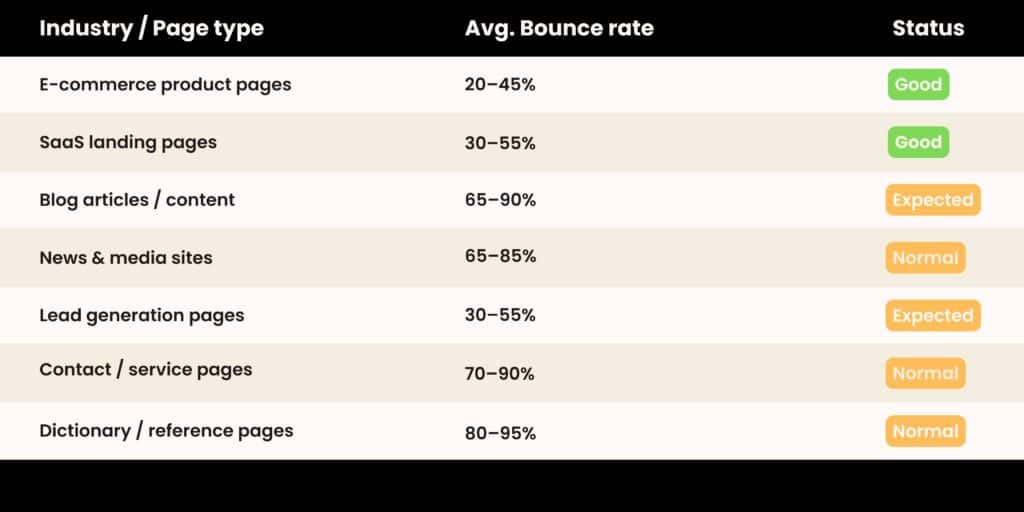
What Is a Good Bounce Rate? Industry Benchmarks
There’s no universal “good” bounce rate. The right benchmark depends heavily on your website type, traffic source, and page intent
💡 Pro Tip
A high bounce rate on a contact page or a dictionary-style reference page is completely normal — users found what they needed and left satisfied. Always measure bounce rate in context of the page’s goal, not in isolation.
Does Bounce Rate Affect Google Rankings?
This is one of the most debated questions in the SEO industry. Here’s the honest answer: bounce rate, as tracked in Google Analytics, is not a direct Google ranking factor — Google has officially said they don’t use your GA data for rankings.
However, the behavior that causes a high bounce rate is deeply related to what Google does measure through its own systems. This is where user experience signals and Core Web Vitals come in.
Google cares about whether your page satisfies the user — and a high bounce rate is often a symptom that it doesn’t.
Google uses a concept called dwell time — how long a user spends on your page after clicking a search result before returning to the SERP. If users consistently click your link and bounce back to Google within seconds, that’s a strong negative user behavior signal that can suppress your rankings over time.
Additionally, Google’s Panda algorithm targets thin, low-quality content that fails to engage users — exactly the kind of content that leads to high bounce rates. And with the rise of RankBrain and machine learning in Google’s algorithm, search intent matching has become critical. If your page doesn’t match what the searcher intended to find, they bounce — and Google learns from that pattern.
✅ Bottom Line
While bounce rate in GA isn’t a direct ranking signal, improving it almost always means improving user experience, content quality, and search intent match — all of which do influence your organic rankings significantly.
Top Causes of a High Bounce Rate
Before fixing a high bounce rate, you need to diagnose why it’s happening. Here are the most common culprits:
1. Slow Page Speed
If your page takes more than 3 seconds to load, a significant portion of visitors will leave before seeing any content. Page load speed is one of the most impactful technical SEO factors affecting both bounce rate and rankings. Tools like Google PageSpeed Insights and GTmetrix can help you diagnose speed issues.
2. Poor Content–Search Intent Match
If someone searches “best running shoes for flat feet” and lands on a generic shoes category page, they’ll leave immediately. Your content must align precisely with the search intent — whether informational, navigational, transactional, or commercial investigation.
3. Bad Mobile Experience
With over 60% of web traffic coming from mobile devices, a poor mobile user experience is a top bounce-rate killer. Tiny fonts, unclickable buttons, and layouts that break on small screens all drive visitors away.
4. Intrusive Pop-ups & Ads
Aggressive pop-ups that appear the moment someone lands on your page destroy trust and trigger immediate exits. Google also penalizes intrusive interstitials on mobile through its Page Experience signals.
5. Misleading Title Tags or Meta Descriptions
Clickbait titles that overpromise and underdeliver in the content create a trust gap. Users click expecting one thing, find another, and bounce — lowering your click-through rate credibility over time.
6. Weak, Thin, or Unformatted Content
Walls of unbroken text, no headers, no visuals, and shallow coverage of a topic make users scan briefly and leave. Content readability, structure, and depth all play huge roles in keeping users engaged.
7. Technical Errors (404s, Broken Pages)
Landing on a broken page or receiving a server error is an instant bounce. Regularly auditing for broken links and technical errors using tools like Screaming Frog or Google Search Console is essential.
How to Reduce Bounce Rate — 10 Proven Strategies
Now for the actionable part. Here are the most effective techniques to lower your bounce rate and improve overall on-page engagement:
- Improve page speed — Compress images (use WebP), enable browser caching, minify CSS/JS, and consider a CDN. Aim for a Largest Contentful Paint (LCP) under 2.5 seconds per Google’s Core Web Vitals standards.
- Match search intent precisely — Before writing or optimizing a page, analyze the top 5 SERP results for your keyword. What format do they use? What does the searcher really want? Build your page around that intent.
- Optimize for mobile-first — Use responsive design, 16px+ font sizes, and touch-friendly buttons. Test your pages with Google’s Mobile-Friendly Test regularly.
- Write compelling introductions — Your opening paragraph must hook the reader immediately. Use the “AIDA” framework — Attention, Interest, Desire, Action — to pull readers deeper into your content.
- Use smart internal linking — Guide users to related articles, category pages, or product pages with natural, contextual internal links. This reduces bounce rate while distributing link equity across your site.
- Break up content visually — Use H2s and H3s, bullet points, infographics, images, videos, and callout boxes. The average reader scans before they read — visual structure earns deeper engagement.
- Add clear calls-to-action (CTAs) — Every page should guide users toward a next step: read a related article, download a guide, watch a video, or contact you. Without a clear path, visitors leave.
- Use exit-intent optimization carefully — Rather than intrusive pop-ups on entry, consider exit-intent triggers (shown only when a user moves to leave) with a compelling offer like a free checklist or discount.
- Improve content depth and E-E-A-T — Google’s helpful content update rewards pages that demonstrate Experience, Expertise, Authoritativeness, and Trustworthiness. In-depth, well-researched content keeps users reading longer.
- A/B test your landing pages — Use tools like Google Optimize or VWO to test different headlines, layouts, CTA placements, and content formats. Data-driven iteration is the fastest path to lower bounce rates.
Bounce Rate in GA4 vs Universal Analytics
In Google Analytics 4 (GA4), the definition of bounce rate has fundamentally changed — and it’s actually more user-friendly for content creators.
GA4 introduced the concept of engaged sessions. A session is considered “engaged” if any of the following occur:
- The user stays on the page for 10+ seconds
- The user triggers a conversion event
- The user views 2 or more pages in the session
In GA4, Bounce Rate = 1 – Engagement Rate. This means if someone reads your article for 5 minutes and leaves, it no longer counts as a bounce in GA4 — a major improvement over the old system.
📊 GA4 vs Universal Analytics
Universal Analytics: Any single-page session = bounce. A reader who spends 15 minutes on your blog post still “bounces.”
GA4: Sessions are measured by engagement. A user reading for 10+ seconds is NOT a bounce — giving you a much more accurate picture of content performance.
If you’ve recently migrated to GA4 and noticed your bounce rate looks dramatically different from Universal Analytics, this is why. Always compare apples to apples when analyzing historical data across both platforms.
Conclusion & Key Takeaways
Bounce rate in SEO is a nuanced but vital metric. While it’s not a direct Google ranking factor, it is a powerful indicator of how well your pages satisfy user intent, deliver quality content, and create engaging experiences.
- Bounce rate measures single-page sessions — users who leave without interacting further.
- A “good” bounce rate is relative to your industry and page type — always benchmark in context.
- Google doesn’t use your GA bounce data directly, but user behavior signals like dwell time absolutely matter.
- High bounce rates are usually caused by slow speed, poor intent match, bad mobile UX, or thin content.
- GA4 uses a smarter engagement-based model — 10+ seconds on page no longer counts as a bounce.
- Focus on content quality, page speed, internal links, and search intent to reduce bounce rate sustainably.
Pingback: What is SEO and How Does It Work? Complete Guide